Developer Guide
- Acknowledgements
- Setting up, getting started
- Design
- Implementation
- Documentation, logging, testing, configuration, dev-ops
- Appendix: Requirements
- Appendix: Instructions for manual testing
- Appendix: Planned Enhancements
- Appendix: Effort
Acknowledgements
- Based on the AddressBook-Level3 project created by the SE-EDU initiative.
Setting up, getting started
Refer to the guide Setting up and getting started.
Design
 Tip: The
.puml files used to create diagrams are in this document docs/diagrams folder. Refer to the PlantUML Tutorial at se-edu/guides to learn how to create and edit diagrams.
Architecture

The Architecture Diagram given above explains the high-level design of the App.
Given below is a quick overview of main components and how they interact with each other.
Main components of the architecture
Main (consisting of classes Main and MainApp) is in charge of the app launch and shut down.
- At app launch, it initializes the other components in the correct sequence, and connects them up with each other.
- At shut down, it shuts down the other components and invokes cleanup methods where necessary.
The bulk of the app’s work is done by the following four components:
-
UI: The UI of the App. -
Logic: The command executor. -
Model: Holds the data of the App in memory. -
Storage: Reads data from, and writes data to, the hard disk.
Commons represents a collection of classes used by multiple other components.
How the architecture components interact with each other
The Sequence Diagram below shows how the components interact with each other for the scenario where the user issues the command delete 1.

Each of the four main components (also shown in the diagram above),
- defines its API in an
interfacewith the same name as the Component. - implements its functionality using a concrete
{Component Name}Managerclass (which follows the corresponding APIinterfacementioned in the previous point.
For example, the Logic component defines its API in the Logic.java interface and implements its functionality using the LogicManager.java class which follows the Logic interface. Other components interact with a given component through its interface rather than the concrete class (reason: to prevent outside component’s being coupled to the implementation of a component), as illustrated in the (partial) class diagram below.

The sections below give more details of each component.
UI component
The API of this component is specified in Ui.java

The UI consists of a MainWindow that is made up of parts e.g.CommandBox, ResultDisplay, PatientListPanel, StatusBarFooter etc. All these, including the MainWindow, inherit from the abstract UiPart class which captures the commonalities between classes that represent parts of the visible GUI.
The UI component uses the JavaFx UI framework. The layout of these UI parts are defined in matching .fxml files that are in the src/main/resources/view folder. For example, the layout of the MainWindow is specified in MainWindow.fxml
The UI component,
- executes user commands using the
Logiccomponent. - listens for changes to
Modeldata so that the UI can be updated with the modified data. - keeps a reference to the
Logiccomponent, because theUIrelies on theLogicto execute commands. - depends on some classes in the
Modelcomponent, as it displaysPatientandAppointmentobjects residing in theModel.
MainWindow also handles switching between views:
-
PatientListPanelis shown when the user is browsing patients -
AppointmentListPanelis shown when the user requests to view appointments
Additionally, the HelpWindow is displayed when the user issues the help command or presses F1.
The StatusBarFooter at the bottom of the UI updates according to what the user is currently viewing
(either overall patient data or a specific patient’s appointment list).
Logic component
API : Logic.java
Here’s a (partial) class diagram of the Logic component:

The sequence diagram below illustrates the interactions within the Logic component, taking execute("delete 1") API call as an example.

 Note: The lifeline for
DeleteCommandParser should end at the destroy marker (X) but due to a limitation of PlantUML, the lifeline continues till the end of diagram.
How the Logic component works:
- When
Logicis called upon to execute a command, it is passed to anDoctorBaseParserobject which in turn creates a parser that matches the command (e.g.,DeleteCommandParser) and uses it to parse the command. - This results in a
Commandobject (more precisely, an object of one of its subclasses e.g.,DeleteCommand) which is executed by theLogicManager. - The command can communicate with the
Modelwhen it is executed (e.g. to delete a patient).
Note that although this is shown as a single step in the diagram above (for simplicity), in the code it can take several interactions (between the command object and theModel) to achieve. - The result of the command execution is encapsulated as a
CommandResultobject which is returned back fromLogic.
Here are the other classes in Logic (omitted from the class diagram above) that are used for parsing a user command:

How the parsing works:
- When called upon to parse a user command, the
DoctorBaseParserclass creates anXYZCommandParser(XYZis a placeholder for the specific command name e.g.,AddCommandParser) which uses the other classes shown above to parse the user command and create aXYZCommandobject (e.g.,AddCommand) which theDoctorBaseParserreturns back as aCommandobject. - All
XYZCommandParserclasses (e.g.,AddCommandParser,DeleteCommandParser, …) inherit from theParserinterface so that they can be treated similarly where possible e.g, during testing.
Model component
API : Model.java

The Model component,
- stores the DoctorBase data i.e., all
Patientobjects (which are contained in aUniquePatientListobject). - stores the currently ‘selected’
Patientobjects (e.g., results of a search query) as a separate filtered list which is exposed to outsiders as an unmodifiableObservableList<Patient>that can be ‘observed’ e.g. the UI can be bound to this list so that the UI automatically updates when the data in the list change. - stores a
UserPrefobject that represents the user’s preferences. This is exposed to the outside as aReadOnlyUserPrefobjects. - does not depend on any of the other three components (as the
Modelrepresents data entities of the domain, they should make sense on their own without depending on other components)
Note: An alternative (arguably, a more OOP) model is given below. It has a MedicalHistory list in DoctorBase, which Patient references. This allows DoctorBase to only require one MedicalHistory object per unique medical history, instead of each Patient needing their own MedicalHistory objects.
Storage component
API : Storage.java

The Storage component,
- can save both DoctorBase data and user preference data in JSON format, and read them back into corresponding objects.
- inherits from both
DoctorBaseStorageandUserPrefStorage, which means it can be treated as either one (if only the functionality of only one is needed). - depends on some classes in the
Modelcomponent (because theStoragecomponent’s job is to save/retrieve objects that belong to theModel)
Common classes
Classes used by multiple components are in the seedu.address.commons package.
Implementation
This section describes some noteworthy details on how certain features are implemented.
Adding appointment feature
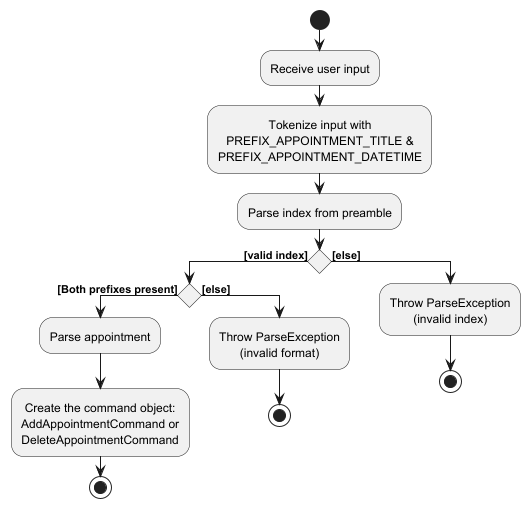
The following activity diagram summarizes what happens when the AddAppointmentParser attempts to parse the user’s input:
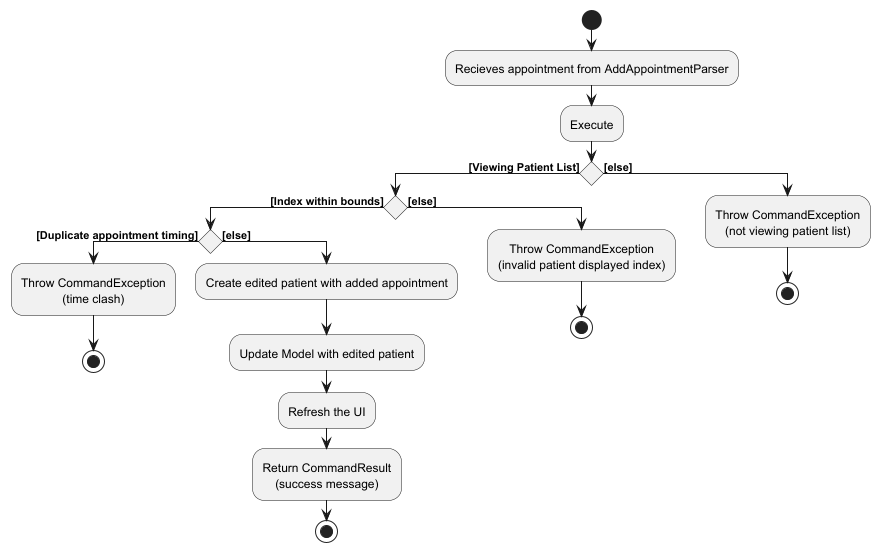
The following activity diagram summarizes what happens when a user executes the AddAppointmentCommand:
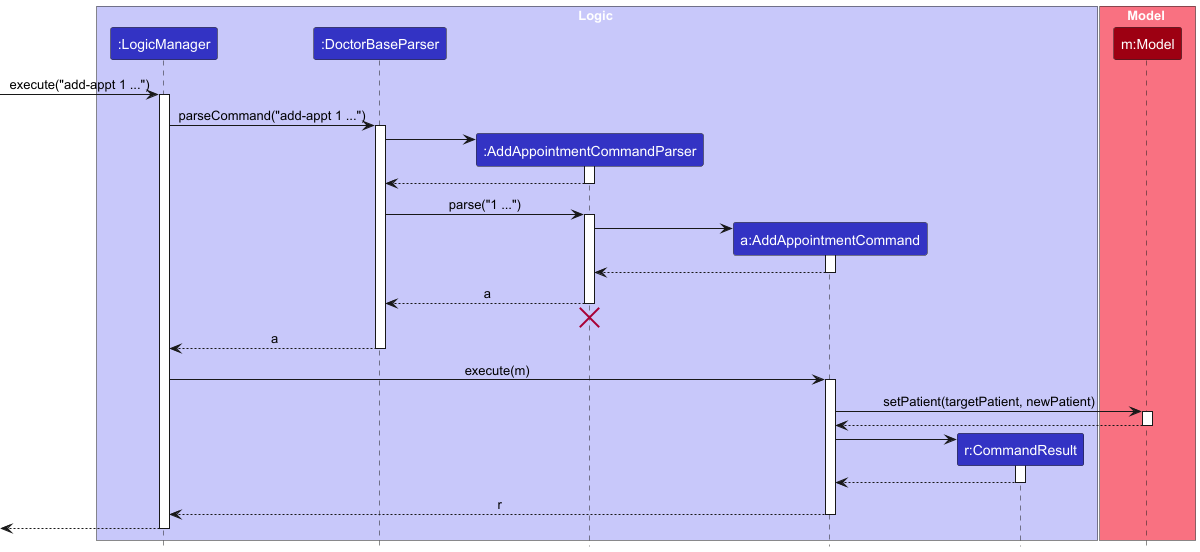
The following sequence diagram shows how an add-appt command interacts within the Logic component.
Using add-appt 1 at/DentalCheckup ad/10-10-2010, 0900 as an example.
Deleting appointment feature
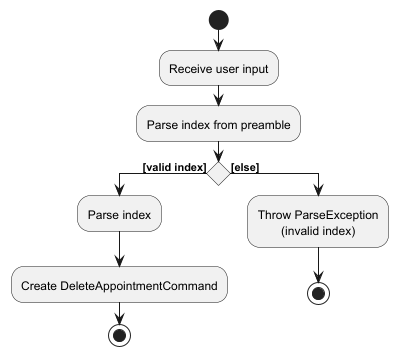
The following activity diagram summarizes what happens when the DeleteAppointmentParser attempts to parse the user’s input:
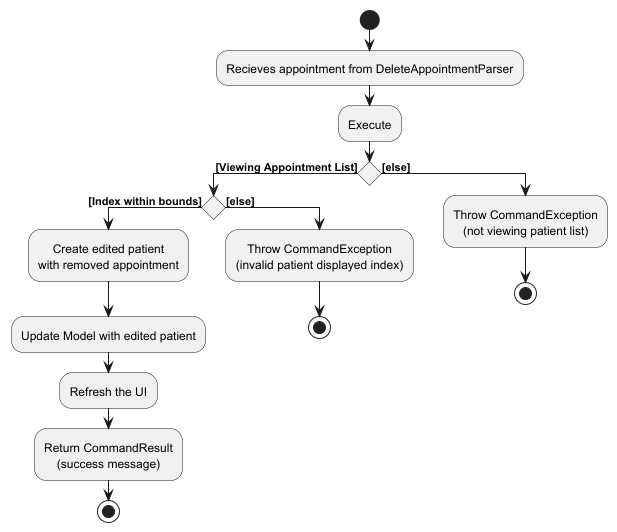
The following activity diagram summarizes what happens when a user executes the DeleteAppointmentCommand:
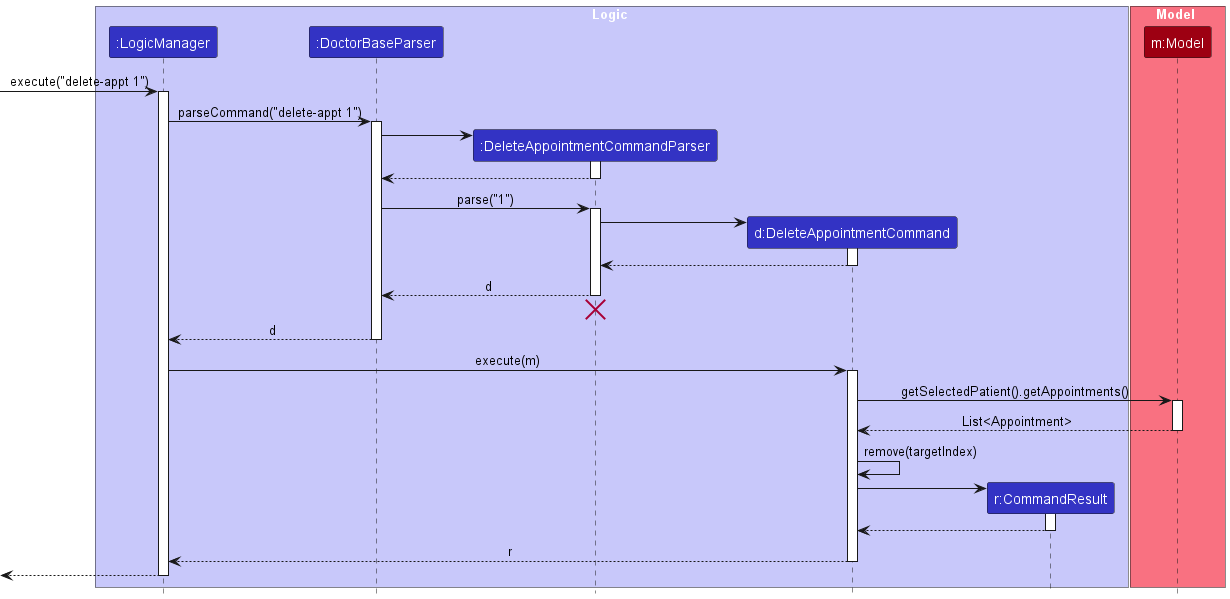
The following sequence diagram shows how a delete-appt command interacts within the Logic component.
Using delete-appt 1 as an example.
Documentation, logging, testing, configuration, dev-ops
Appendix: Requirements
Product scope
Target user profile:
- Solo doctor who manages administrative tasks on their own.
- prefer desktop apps over other types
- can type fast
- prefers typing to mouse interactions
- is reasonably comfortable using CLI apps
Value proposition:
- Simplifies administrative workload
- Can manage patient records and appointments faster than a typical mouse/GUI driven app
- Reduces forgotten or missed appointments
User stories
Priorities: High (must have) - * * *, Medium (nice to have) - * *, Low (unlikely to have) - *
| Priority | As a … | I want to … | So that I can… |
|---|---|---|---|
* * * |
new user | see usage instructions | refer to instructions when I forget how to use the app |
* * * |
doctor | add patient details | keep track of my patients |
* * * |
doctor | delete patient details | remove information on patients I no longer need |
* * * |
doctor | find a patient by name | locate details of patients without having to go through the entire list |
* * * |
doctor | list patient details | view all of my patients’ information |
* * * |
doctor | see my patients’ appointments | prepare for upcoming appointments |
* * * |
doctor | add a patient’s appointment | register a new appointment |
* * * |
doctor | delete a patient’s appointment | handle cancellation of appointments |
* * * |
doctor | edit patients’ contacts | edit patients’ information |
* * * |
doctor | see all stored appointments | easily see upcoming appointments |
* * * |
doctor | edit upcoming appointments | reschedule appointments if needed |
* * |
doctor | search appointments by patient name | quickly locate a specific consultation |
* * |
doctor | add detailed notes for each patient | remember diagnoses, observations and treatments |
* |
doctor | attach documents/links | easily reference patient documents |
* |
busy doctor | autocomplete commands | use the program more easily without technological know-how |
* |
busy doctor | use alias commands | quickly add patient and appointment information via shortcuts |
Use cases
(For all use cases below, the System is the DoctorBase and the Actor is the user, unless specified otherwise)
Use case: UC1 - Add patient
MSS
- User chooses to add patient with relevant details
- DoctorBase adds patient into patient list
Use case ends.
Extensions
- 1a. DoctorBase detects an invalid parameter in the entered details
- 1a1. DoctorBase rejects command and does not add patient into patient list
Use case ends.
- 1a1. DoctorBase rejects command and does not add patient into patient list
- 1b. DoctorBase detects a duplicate patient entry
- 1b1. DoctorBase rejects command and does not add patient into patient list
Use case ends.
- 1b1. DoctorBase rejects command and does not add patient into patient list
Use case: UC2 - List current patients
MSS
- User chooses to view a list of current patients
- DoctorBase shows list of patients to user
Use case ends.
Extensions
- 2a. DoctorBase detects no entries in list
Use case ends.
Use case: UC3 - Delete patient
MSS
- User chooses to delete a patient from DoctorBase
- DoctorBase deletes the patient entry from storage
Use case ends.
Extensions
- 2a. DoctorBase does not find an entry of the selected patient
- 2a1. DoctorBase rejects command and does nothing
Use case ends.
- 2a1. DoctorBase rejects command and does nothing
Use case: UC4 - Add appointment
MSS
- User chooses to add an appointment to DoctorBase
- DoctorBase adds the appointment into appointment storage
Use case ends.
Extensions
- 1a. DoctorBase detects that the given INDEX does not correspond to any patient in the current list
- 1a1. DoctorBase rejects command and does nothing
Use case ends.
- 1a1. DoctorBase rejects command and does nothing
- 1b. DoctorBase detects duplicate appointment
- 1b1. DoctorBase rejects command and does nothing
Use case ends.
- 1b1. DoctorBase rejects command and does nothing
- 1c. DoctorBase detects invalid parameter in appointment details
- 1c1. DoctorBase rejects command and does nothing
Use case ends.
- 1c1. DoctorBase rejects command and does nothing
Use case: UC5 - List patient’s appointments
MSS
- User chooses to view a list of existing appointments for a specific patient
- DoctorBase shows the list of existing appointments to User
Use case ends.
Extensions
- 1a. DoctorBase detects that the given INDEX does not correspond to any patient in the current list
- 1a1. DoctorBase rejects command and does nothing
Use case ends.
- 1a1. DoctorBase rejects command and does nothing
- 2a. DoctorBase detects no entries in list
Use case ends.
Use case: UC6 - List all upcoming appointments
MSS
- User chooses to view the list of all upcoming appointments
- DoctorBase shows the list of existing appointments to User
Use case ends.
Extensions
- 2a. DoctorBase detects no entries in list
Use case ends.
Use case: UC7 - Delete appointment
MSS
- User chooses to delete an appointment entry from the list of existing appointments
- DoctorBase deletes the appointment entry from the list of existing appointments
Use case ends.
Extensions
- 2a. DoctorBase does not find the indicated appointment entry
- 2a1. DoctorBase rejects command and does nothing
Use case ends.
- 2a1. DoctorBase rejects command and does nothing
Use case: UC8 - Find patient by name
MSS
- User chooses to find patients by name in DoctorBase
- DoctorBase lists all patients whose names contain any of the given keywords (case-insensitive, full-word match)
Use case ends.
Extensions
- 1a. No keyword is entered
- 1a1. DoctorBase rejects the command and does nothing
Use case ends.
- 1a1. DoctorBase rejects the command and does nothing
- 2a. No patient names match the given keywords
- 2a1. DoctorBase displays an empty list. Use case ends.
Use case: UC9 - Edit patient
MSS
- User chooses to edit a patient’s details.
- DoctorBase updates the patient’s record with the new details.
Use case ends.
Extensions
- 2a. DoctorBase detects an invalid patient index
- 2a1. DoctorBase rejects command and does nothing
Use case ends.
- 2a1. DoctorBase rejects command and does nothing
- 2b. User provides no fields to edit
- 2b1. DoctorBase rejects command and does nothing
Use case ends.
- 2b1. DoctorBase rejects command and does nothing
- 2c. DoctorBase detects a duplicate patient after editing
- 2c1. DoctorBase rejects command and does nothing
Use case ends.
- 2c1. DoctorBase rejects command and does nothing
Use case: UC10 - Edit appointment
MSS
- User chooses to edit a patient’s appointment.
- DoctorBase updates the appointment with the new details.
Use case ends.
Extensions
- 1a. User is not currently viewing a patient’s appointment list
- 1a1. DoctorBase rejects command and does nothing
Use case ends.
- 1a1. DoctorBase rejects command and does nothing
- 2a. DoctorBase detects an invalid appointment index
- 2a1. DoctorBase rejects command and does nothing
Use case ends.
- 2a1. DoctorBase rejects command and does nothing
- 2b. User provides no fields to edit
- 2b1. DoctorBase rejects command and does nothing
Use case ends.
- 2b1. DoctorBase rejects command and does nothing
- 2c. DoctorBase detects a clashing appointment time
- 2c1. DoctorBase rejects command and does nothing
Use case ends.
- 2c1. DoctorBase rejects command and does nothing
Non-Functional Requirements
- The system should respond within 2 seconds (performance)
- The system should only be used by 1 user (scalability)
- The system should function on Windows 11, Linux, and MacOS (usability)
- The system should not store more than 500 patients
- The system should not store more than 5000 appointments
Glossary
- Solo doctor: A doctor that takes care of patients under them by themselves with no other assistance
- Patient: A person that receives care and has appointments with the solo doctor
- Appointment: A scheduled medical meeting between the patient and the solo doctor
- JSON (JavaScript Object Notation): The file format the application uses to store patient and appointment details
Appendix: Instructions for manual testing
Given below are instructions to test the app manually.
Note: These instructions only provide a starting point for testers to work on;
testers are expected to do more exploratory testing.
Launch and shutdown
-
Initial launch
-
Download the jar file and copy into an empty folder
-
Double-click the jar file Expected: Shows the GUI with a set of sample patients. The window size may not be optimum.
-
-
Saving window preferences
-
Resize the window to an optimum size. Move the window to a different location. Close the window.
-
Re-launch the app by double-clicking the jar file.
Expected: The most recent window size and location is retained.
-
Finding a patient
-
Finding a patient while all patients are being shown.
-
Prerequisites: None.
-
Test case:
find alex
Expected: Shows patients that includealexin theirNAME.
-
Deleting a patient
-
Deleting a patient while all patients are being shown.
-
Prerequisites: List all patients using the
listcommand. Multiple patients in the list. -
Test case:
delete 1
Expected: First patient is deleted from the list. Details of the deleted patient shown in the status message. -
Test case:
delete 0
Expected: No patient is deleted. Error details shown in the status message. -
Other incorrect delete commands to try:
delete,delete x,...(where x is larger than the list size)
Expected: Similar to previous.
-
Adding a patient
-
Adding a patient while all patients are being shown
-
Prerequisites: List all patients using the
listcommand. -
Test case:
add n/John Doe i/S8052802G g/m p/98765432 e/johnd@example.com d/12-12-2002 a/John street, block 123, #01-01
Expected: New patient added. Details of the added patient shown in the status message. -
Test case (missing
GENDER):add n/John Doe i/S8052802G p/98765432 e/johnd@example.com d/12-12-2002 a/John street, block 123, #01-01
Expected: No patient added. Error details shown in status message. -
Test case (invalid
NRIC):add n/John Doe i/A8052802G g/m p/98765432 e/johnd@example.com d/12-12-2002 a/John street, block 123, #01-01
Expected: No patient added. Error details shown in status message.
-
Editing a patient
-
Editing a patient while all patients are being shown.
-
Prerequisites: List all patients using the
listcommand. At least 1 patient in the list. -
Test case:
edit 1 p/91234567 e/johndoe@example.com
Expected: First patient edited. Details of edited patient shown in the status message -
Test case:
edit 1
Expected: No patient edited. Error details shown in status message. -
Test case (duplicate
NRIC):edit 1 i/S7101271I
Expected: No patient added. Error details shown in status message.
-
Listing all patients
-
Listing all patients from appointment list
-
Prerequisite: List all appointments of the 1st patient using the
list-appt 1command. At least 1 patient in list -
Test case:
list
Expected: Listed all patients -
Test case:
list aewawsdExpected: Listed all patients
-
Adding an appointment
-
Adding an appointment to the first patient’s appointment list.
-
Prerequisite: List all patients using the
listcommand. At least 1 patient in list. There is no existing appointment with the same appointment timing. -
Test case:
add-appt 2 at/flu jab ad/27-02-2025, 0900
Expected: New appointment added. Details of the updated patient shown in the status message. -
Test case:
add-appt 2 at/flu jab ad/30-02-2025, 0900
Expected: No appointment added. Error details shown in status message.
-
Editing an appointment
-
Editing an appointment of the first patient’s appointment list.
-
Prerequisite: List all appointments of first patient using the
list-appt 1command. At least 1 patient in list. There is no existing appointment with the same appointment timing. At least 1 appointment in appointment list. -
Test case:
edit-appt 1 at/dental ad/02-02-2002, 0900
Expected: First appointment of first patient edited. Details of updated patient shown in the status message -
Test case:
edit-appt 1
Expected: No appointment edited. Error details shown in status message.
-
Deleting an appointment
-
Deleting an appointment of the first patient’s appointment list.
-
Prerequisite: List all appointments of first patient using the
list-appt 1command. At least 1 patient in list. At least 1 appointment in appointment list -
Test case:
delete-appt 1
Expected: First appointment of first patient gets deleted. Details of updated patient shown in the status message. -
Test case:
delete-appt 0
Expected: No appointment deleted. Error details shown in status message.
-
Listing all appointments
-
Listing all appointments of first patient.
-
Prerequisite: List all patients using the
listcommand. At least 1 patient in list. -
Test case:
list-appt 1
Expected: First patient’s appointment list shown. Listed all appointments for first patient. -
Test case:
list-appt 0
Expected: No appointment list shown. Error details shown in status message.
-
Listing all upcoming appointments
-
Listing all upcoming appointments
-
Prerequisite: None.
-
Test case:
list-appt-upcoming
Expected: All upcoming appointments shown. Listed all upcoming appointments. -
Test case:
list-appt-upcoming 123123123
Expected: All upcoming appointments shown. Listed all upcoming appointments.
-
Saving data
-
Dealing with missing data files.
-
From the initial sample data, run any valid command to initiate a save to the data file.
-
Close the application.
-
Delete the data file and re-launch the application.
Expected: DoctorBase will start with the sample data again.
-
-
Dealing with corrupted data files.
-
From the initial sample data, run any valid command to initiate a save to the data file.
-
Close the application.
-
Modify
data/doctorBase.jsonto corrupt it.
E.g. Modifypatientstopatient
Expected: DoctorBase will start with no data. The data file will only be updated when a save is initiated.
-
Appendix: Planned Enhancements
Team Size: 5
-
Support for special characters in Patient Names.
Currently, special characters (e.g./,ö,', etc.) are not accepted as valid inputs for Patient names.
The enhancement will expand input validation to support UTF-8 character sets, allowing more realistic patient names. -
Support for Patients without NRIC.
Current implementation requires all patients to have a valid Singapore NRIC.
The enhancement will relax this constraint and accept alternative identifiers such as Passport numbers or Foreign ICs. -
Improve error message handling when in wrong view.
When in the wrong view, error messages indicating that the user should be in another view is only displayed if the commands are typed with correct parameters.
The enhancement will display the Wrong View error message as long as the command word is inputted and in the wrong view. -
Support Appointment Commands when in Upcoming Appointments view.
Users cannot delete or edit appointments directly from thelist-appt-upcomingview.
The enhancement will track the patient-appointment mapping internally, allowing:list-appt-upcoming delete-appt 1 edit-appt 2 ad/02-02-2026, 1500 -
More flexible
findCommand using Regex/Partial.
findcurrently matches only full words.
The enhancement will allow partial matches and regular expressions, such as:-
find hanmatchesHannah Ho,Hans TanandJohan Chan -
find ^hanmatches onlyHannah HoandHans Tan
-
-
Find feature for appointments.
Inlist-apptandlist-appt-upcomingview, users cannot search for appointments by any of the field.
The enhancement would allow users to find specific appointments by name or by date. -
Preserve filtered context after
editcommand.
When users execute certain commands such aseditafter usingfind, the app resets to show the full Patients view.
The enhancement will retain the filtered context after such commands, ensuring that the view remains focused on the filtered subset. -
Notes-taking feature for Appointments.
Currently, appointment entries only store basic details such as appointment title, date and time.
The enhancement will allow users to add and view short text notes for each appointment, such as consultation summaries and follow-up reminders.
Appendix: Effort
Given below are how we expanded upon AB3 to fit our users (solo doctors)
Fields of Patient
The Patient class (refactored from Person) had basic field of a typical person, however, it did not have some of the fields we would expect to be stored in a patient’s info
such as:
- Date of birth
- Gender
- Medical history
Hence, the missing DateOfBirth and Gender classes had to be made from scratch, with reference from the existing AB3 fields (Name, Email, etc.)
While this was manageable, it required us to have an understanding of how the fields functioned and interacted with the rest of the system.
Whereas for MedicalHistory, we were able to refactor the existing Tag field in order for it to more properly fit our desired project scope.
Appointment model
Appointments are things that every patient would have, and would also be something that would happen at a specified date and time, to achieve an event, such as an injection.
However, having these inner fields would mean that the appointments would need to be implemented as a new model, with the date and time of the appointment, and the event happening at the appointment, as its fields.
The Appointment model had to be built from scratch, including the fields:
- Title
- DateTime
The Appointment class also had to be integrated as a field of Patient, as to fit the project scope.
Appointment commands
With a new model, there would be new commands tied to it as well
Hence, add-appt, edit-appt, delete-appt and list-appt were implemented.
To implement these commands, we were able to reference the existing add, edit, delete and list commands.
However, there were also some caveats such as the selection of the patient to be operated on, requiring changes in core underlying classes such as LogicManager and ModelManager to implement a selectedPatient field and methods such as getSelectedPatient().
View model handling
With the new commands with realistic restrictions such as edit-appt requiring the UI to be viewing a patient’s appointment list, checks based on what the UI was viewing had to be implemented.
Hence, a ViewMode enum class had to be built and implemented into ModelManager in order to track what the user is currently viewing.
With this, we were able to properly restrict the usage of certain commands to their required ViewMode.